This page shows the information as of the date it was posted. Later updates may mean that the current screens and steps differ. For the latest information, see the articles linked on this page.
"Add to dictionary" in Find and Replace now uses the department dictionary
When you use "Add to dictionary" in Find and Replace for minutes, the word is now added to the dictionary of the department that owns the folder where the meeting is saved.
When you replace text in Find and Replace for minutes with Add to dictionary checked, the replacement word is now added to the dictionary of the department that owns the folder where the meeting is saved. The checkbox shows the destination, as in "Add to the (department name) dictionary".
Words registered in a department's dictionary are used for interpretation in meetings saved in that department's folder, and are not used in other departments' meetings. You can register each department's specialist terms without them getting mixed into unrelated meetings.
If the meeting is saved outside a department folder (for example, in a personal folder), the word is added to the dictionary of the department of the person who performs the replacement.
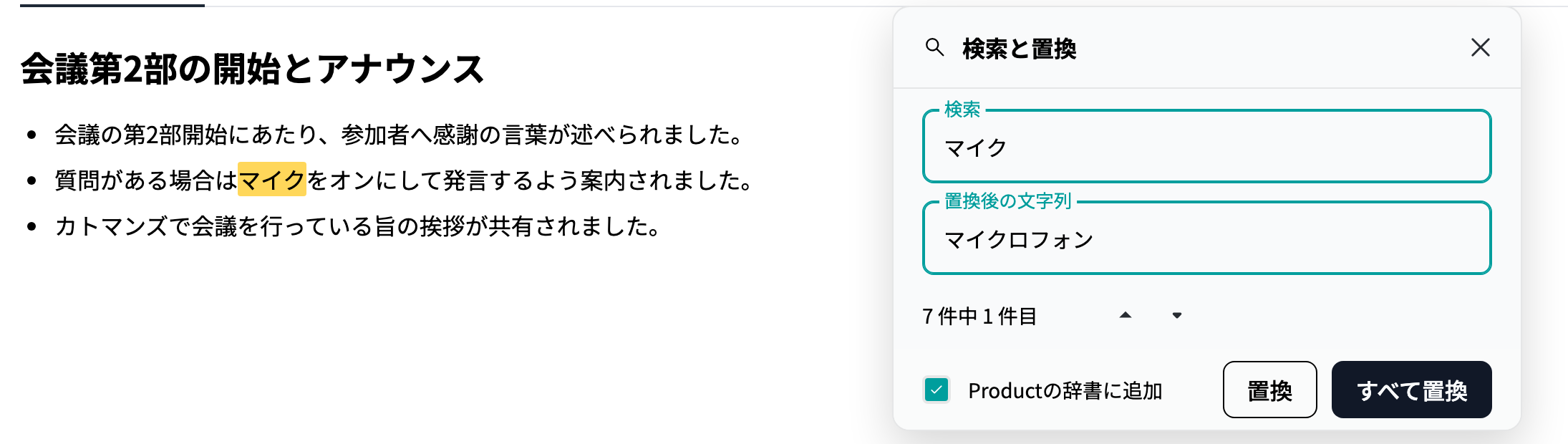
For details, see Adding to the dictionary and Department dictionaries.