This page was machine-translated from the Japanese original and may contain unnatural wording or errors. View the Japanese page
Deleting an Account You Created Yourself
Read this article when
- You want to delete an account you registered on your own as a trial before your company adopted the service
- Inviting you as a member from your organization admin failed because of a duplicate email address
- You accidentally created another account with the same email address
Cause
CoeFont allows only one account per email address. If an account you created yourself still exists, you cannot be invited to an organization with the same email address. To use CoeFont as a member of your organization, delete your personal account first.
Solution
Before you delete
A deleted account cannot be restored
- When you delete an account, all of its data is deleted and cannot be recovered.
- Only Free plan accounts can be deleted. If you are on a paid plan, change to the Free plan first. You cannot delete the account until your contract period ends.
- Organization admins cannot delete other people's accounts. The account owner must do it.
- If your paid plan still has contract time remaining and you are in a hurry, or if you cannot do this yourself, contact us through the inquiry form.
How to delete an account
- Log in to the CoeFont Interpreter admin console with the email address of the account you want to delete.
- Under "Account Management" in the left menu, click Personal Settings.
- Click Delete account at the bottom of the screen.
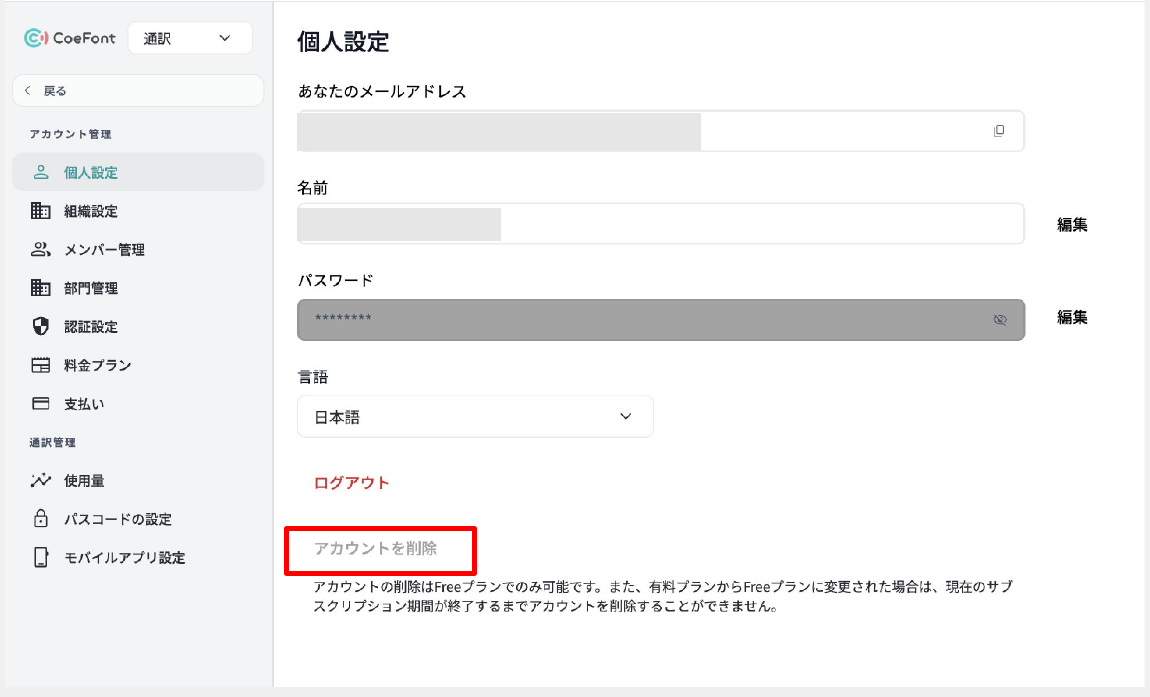
- Follow the on-screen instructions to complete the deletion.
Once the account is deleted, the duplicate email address is resolved. Ask your organization admin to send the invitation again.
If deletion fails
You may see the message "Failed to delete the account. Please wait a moment and try again."
- Wait a while, then try deleting again.
- If you still cannot delete the account after several attempts, contact us.
If the problem persists
Contact us through the inquiry form. Please include the following information.
- The email address of the account you want to delete
- A screenshot of the error screen
- Whether you had a paid plan
Related information
Did this article solve your problem?